
In a fast-moving business environment, timing often determines the success or failure of customer interactions and internal processes. Missed follow-ups, delayed task assignments, and outdated record statuses can quickly lead to lost opportunities, reduced productivity, and poor customer experiences. As teams scale and workflows become more complex, managing these time-sensitive activities manually becomes both inefficient and unreliable. This is where Scheduled Actions in Zoho CRM play a vital role.
Scheduled Actions enable businesses to automate critical CRM activities such as sending emails, creating tasks, and updating fields based on predefined time-based conditions. Instead of depending on manual reminders or constant record tracking, teams can configure Zoho CRM to execute actions automatically at the exact moment they are needed. This ensures that no follow-up is missed, no task is delayed, and no record is left outdated. By embedding time-driven automation into everyday workflows, Scheduled Actions in Zoho CRM bring consistency and structure to CRM operations. This automation helps organizations operate more efficiently while delivering timely, reliable, and well-coordinated customer experiences.
Scheduled Actions in Zoho CRM are time-based automation tools that allow businesses to execute predefined actions automatically after a specific interval or on a fixed date. Unlike instant workflow actions that run immediately, scheduled actions focus on when something should happen, making them ideal for follow-ups, reminders, and status-driven updates that depend on time.
With Scheduled Actions, teams can configure actions to trigger minutes, hours, or days after a particular event, such as record creation, field updates, or stage changes. Actions can also run on a specific date stored in a CRM field, like a contract expiry date, renewal date, or follow-up on proposals and deadlines. This flexibility ensures that CRM processes stay aligned with real-world timelines.
Scheduled Actions typically work in conjunction with workflow rules, forming a powerful automation layer within Zoho CRM. Once the workflow conditions are met, the planned action executes at the defined time without manual intervention. This approach eliminates the need for reminders, spreadsheets, or constant monitoring of records.
Scheduled Actions in Zoho CRM follow a clear, step-by-step flow that ensures actions occur at the right time without manual intervention. This structured process helps teams automate time-sensitive activities while maintaining accuracy and consistency across CRM workflows.
Steps to Scheduled Actions in Zoho CRM work:
By following these steps, Scheduled Actions in Zoho CRM help businesses stay proactive, reduce delays, and maintain smooth, time-driven CRM operations.
Scheduled Actions in Zoho CRM support different automation needs by allowing businesses to trigger emails, tasks, and field updates at predefined times. Each action type plays a distinct role in keeping CRM processes timely, structured, and consistent. By combining these actions within workflows, teams can automate follow-ups, enforce accountability, and maintain accurate data without manual effort. Understanding these action types helps businesses design smarter, time-driven CRM workflows that improve productivity and customer engagement.
Scheduled email notifications help businesses deliver timely communication without relying on manual follow-ups. By scheduling emails in Zoho CRM, teams can automate responses or emails based on time intervals or specific dates tied to records. This ensures prospects and customers receive the right message at the right time.
Sales teams can automate follow-up emails after proposals, send reminders before contract expirations, or notify prospects about upcoming webinars and meetings. Support and operations teams can use scheduled emails to share updates or alerts without constant monitoring. By automating these communications, businesses improve response rates, maintain consistency, and ensure that no important interaction gets delayed or overlooked.
Scheduled task creation focuses on internal accountability and structured execution. With Scheduled Actions in Zoho CRM, the system automatically assigns tasks to users at predefined times, ensuring that follow-ups and reviews happen as planned.

Common use cases include creating call tasks after lead assignment, assigning follow-up tasks when a deal changes stages, or scheduling internal reviews for high-value opportunities. This automation reduces dependency on managers to remind teams and ensures that responsibilities are clearly defined. As a result, teams stay proactive, organized, and aligned with process timelines.
Scheduled field updates help businesses maintain clean, accurate, and actionable CRM data. Using Scheduled Actions in Zoho CRM, records update automatically at a scheduled time without manual edits.
Businesses often use this feature to update deal stages after inactivity, change follow-up statuses automatically, or mark records as expired once a set date passes. These updates can also trigger additional workflows, ensuring CRM processes continue to move forward. By automating field updates, organizations reduce data inconsistencies, improve reporting accuracy, and keep CRM records aligned with real-time business conditions.
Real value emerges when Scheduled Actions in Zoho CRM align with real-world business journeys. Instead of isolated automations, scheduled actions help businesses design end-to-end, time-driven workflows that guide teams and customers seamlessly from one stage to the next. Below are two industry-specific use cases that show how scheduled actions support structured execution, timely communication, and better outcomes.
In a travel agency, speed and consistency play a crucial role once a proposal is shared with a customer. Using Scheduled Actions in Zoho CRM, agencies can automate the entire post-quotation journey without relying on manual reminders.
The journey begins when a sales consultant sends a travel quote from Zoho CRM. At this stage, a workflow triggers scheduled actions tied to the quote due date. After two days, Zoho CRM automatically sends a follow-up email to the customer, checking interest and offering assistance. Simultaneously, the system creates a follow-up call task for the consultant, ensuring personal outreach happens on time.
If the customer does not respond within a defined period, scheduled field updates can move the deal to a “Follow-Up” stage, keeping the pipeline accurate. Another scheduled email can go out a few days later with a limited-time offer or booking reminder. Once the customer confirms, the deal stage updates automatically, and internal tasks are created for operations teams to begin vendor confirmations and documentation.
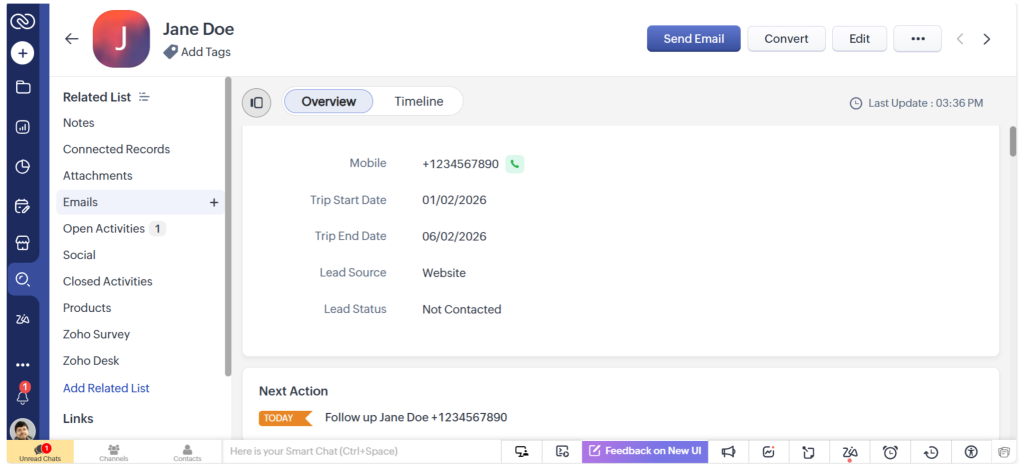
This structured, time-based journey ensures no proposal is forgotten, follow-ups remain consistent, and conversion rates improve, without adding manual workload for sales teams.
In real estate, missed follow-ups after site visits often result in lost opportunities. Scheduled Actions in Zoho CRM help agencies manage this critical window with precision and consistency.
The journey starts when an agent schedules and completes a site visit for a prospective buyer. Once the site visit status updates in Zoho CRM, a scheduled action triggers an automated thank-you email the same day, reinforcing professionalism and engagement. Two days later, Zoho CRM creates a task for the agent to call the prospect and capture feedback.
If the prospect shows interest, scheduled actions can automatically send property brochures, pricing details, or payment plans after a defined interval. At the same time, field updates can move the deal to an “Interested” or “Negotiation” stage, keeping reporting accurate. If no response is received, Zoho CRM can trigger reminder emails or reassign follow-up tasks to ensure the lead does not go cold.
These use cases highlight how Scheduled Actions in Zoho CRM transform time-sensitive processes into reliable, scalable workflows tailored to industry needs.
Using Scheduled Actions in Zoho CRM helps businesses bring structure, consistency, and reliability to time-sensitive CRM activities. Instead of depending on manual reminders or constant monitoring, teams can rely on automation to keep processes moving at the right pace. This not only improves operational efficiency but also enhances the overall customer experience by ensuring timely communication and follow-ups.
Key benefits of Scheduled Actions in Zoho CRM include:
By embedding time-driven automation into everyday workflows, businesses create dependable and repeatable CRM processes that scale effortlessly as operations grow.
To unlock the full potential of Scheduled Actions in Zoho CRM, businesses must design automation thoughtfully. A well-planned approach ensures that scheduled actions support productivity rather than overwhelm users with unnecessary triggers.
Best practices to follow include:
When configured correctly, Scheduled Actions in Zoho CRM enable scalable automation that strengthens efficiency while keeping workflows clean, relevant, and easy to manage.
Scheduled Actions in Zoho CRM play a critical role in helping businesses manage time-driven processes with precision and consistency. By automating emails, task assignments, and field updates, organizations eliminate delays and manual follow-ups. This ensures that every action occurs exactly when it should. This creates structured workflows that run reliably in the background, even as teams handle growing volumes of data and customer interactions.
Instead of reacting to missed reminders or outdated records, teams work proactively with Zoho CRM executing routine actions automatically. Sales teams stay on top of follow-ups, service teams manage renewals efficiently, and operations teams maintain accurate, up-to-date data without constant intervention. This level of automation not only improves productivity but also enhances accountability and visibility across the organization. For businesses aiming to scale without adding operational complexity, Scheduled Actions in Zoho CRM become a strategic necessity. Here are our experts to help you know more.