

Every deal progresses through conversations, follow-ups, and negotiations, but the proposal is where everything truly comes together. It is not just another document; it is the final representation of your value, clarity, and professionalism. Yet, many businesses still rely on disconnected tools to create proposals, which slows down momentum and introduces avoidable errors. This is where creating client-ready proposals with Zoho CRM become a game-changer. By bringing proposal creation directly into your CRM interface and integrating seamlessly with DocHipo, teams can eliminate repetitive work, ensure accuracy, and deliver polished proposals that reflect their brand at every stage.
In this blog, we will walk you through a structured and practical approach to generating proposals directly from Zoho CRM using the DocHipo extension. You will understand how to move from scattered processes to a unified workflow, how to use deal data for instant personalization, and how to maintain consistency across every proposal you send. Whether you are part of a sales team, an agency, or a consulting business, this guide will help you simplify your process, improve efficiency, and create proposals that not only look professional but also help you close deals faster.
Sales teams often manage their pipeline efficiently inside Zoho CRM, where deals are updated, contacts are tracked, and activities are logged in a structured manner. This creates a smooth and organized sales process. However, proposal creation usually happens outside the system, which disrupts this flow. Teams are forced to export data or manually copy details into separate documents, and they spend additional time adjusting formatting and verifying information. This shift not only slows down the process but also introduces unnecessary complexity into an otherwise streamlined workflow.
As deal cycles become faster, this gap becomes more evident. Manual effort increases the chances of errors and makes it difficult to maintain consistency across proposals. Even small mistakes can affect client perception and delay decision-making. To keep up with modern sales demands, teams need a way to create client-ready proposals with Zoho CRM without leaving the system. A connected approach is no longer optional; it is essential for maintaining efficiency and delivering a consistent client experience.
To address this gap, businesses need a solution that integrates directly with their existing workflow. Instead of relying on disconnected tools, DocHipo brings proposal creation inside Zoho CRM, making the entire process more efficient and structured. With its seamless integration, teams can generate proposals directly from deal records while ensuring accuracy and consistency.
With DocHipo, you can:
By bringing everything into one place, DocHipo enables teams to create client-ready proposals with Zoho CRM in a faster, smarter, and more reliable way.
The DocHipo extension connects directly with Zoho CRM and brings proposal creation into the same environment where deals are managed. Instead of relying on external tools, users can now generate proposals directly from deal records without breaking their workflow. Once installed, a dedicated Create DocHipo Proposal button appears inside each deal, making it easy to initiate the process with a single click. This simple addition removes the need to switch platforms and keeps everything aligned within one system.
The integration ensures that all relevant deal data flows directly into the proposal. This includes information from the deal, along with related account and contact details. By eliminating manual data entry, it reduces errors and saves time. More importantly, it creates a unified and structured approach to building client-ready proposals with Zoho CRM. The result is a faster, more reliable workflow that supports consistent and professional proposal creation.
Creating proposals within Zoho CRM becomes a straightforward process with the DocHipo extension. Each step is designed to reduce effort while maintaining accuracy and consistency. Let us walk through the process step by step.
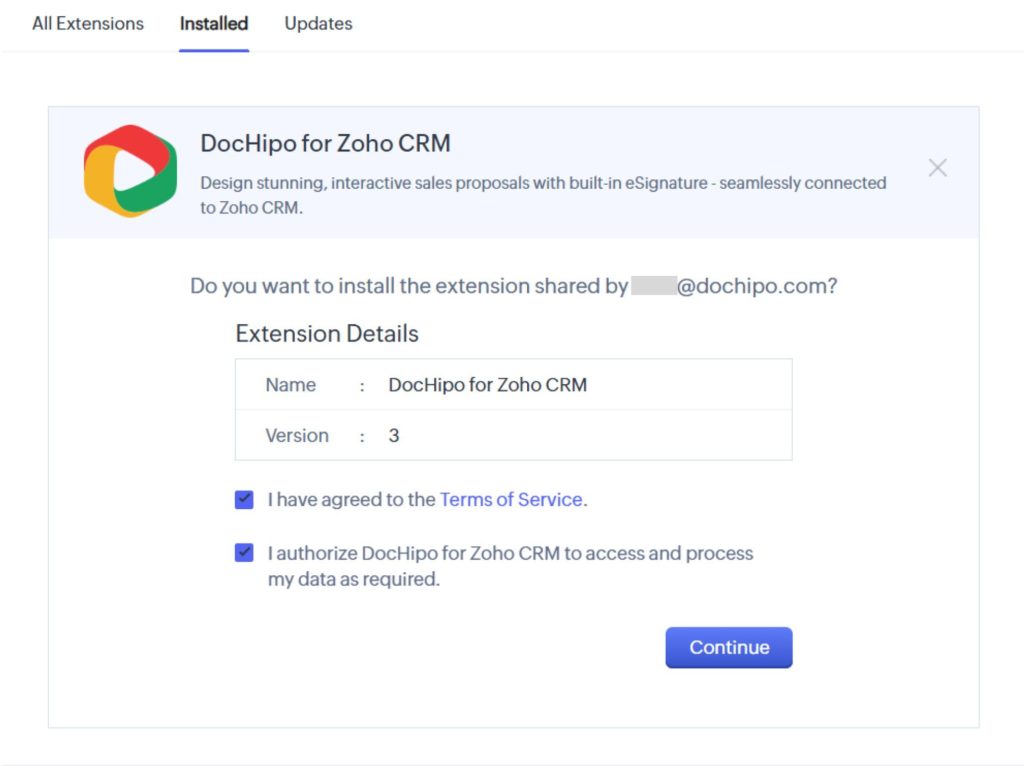
Start by accessing the Zoho CRM Marketplace and searching for the DocHipo extension. Install the extension and grant the required permissions to complete the setup. Ensure that it is enabled for the relevant users in your organization. Once installed, the integration becomes active within seconds, allowing your team to begin creating client-ready proposals with Zoho CRM without any delay.
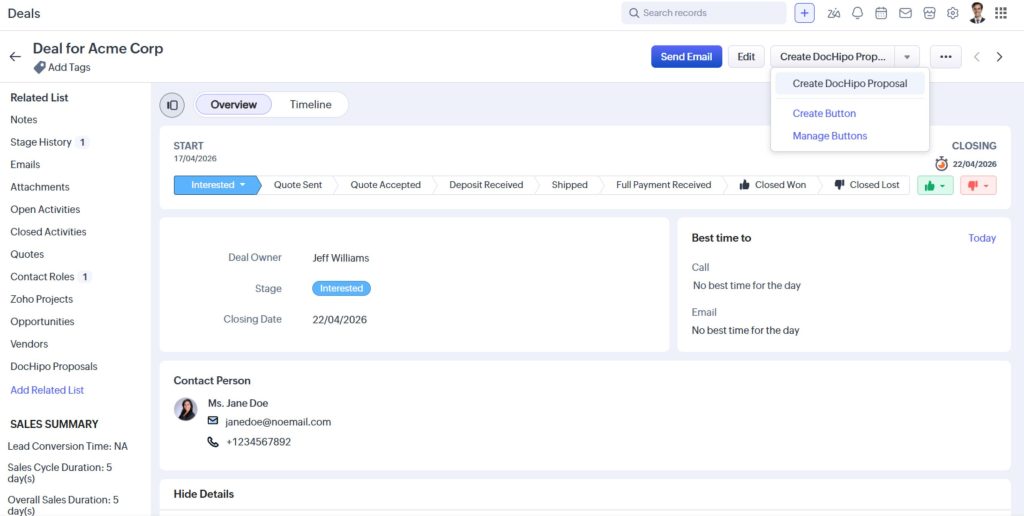
Open any deal record inside Zoho CRM and locate the Create DocHipo Proposal button on the top-right corner of your screen. Click this button to initiate the process. You will be redirected to DocHipo, after which you can select a suitable template.
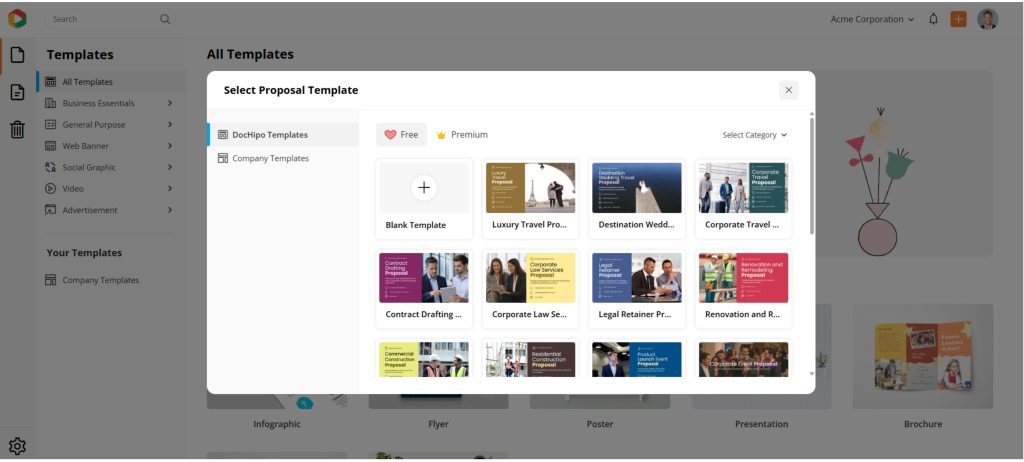
Templates can be chosen from the default library or from your company’s saved templates. This step establishes the structure and design of your proposal, ensuring consistency across all documents.
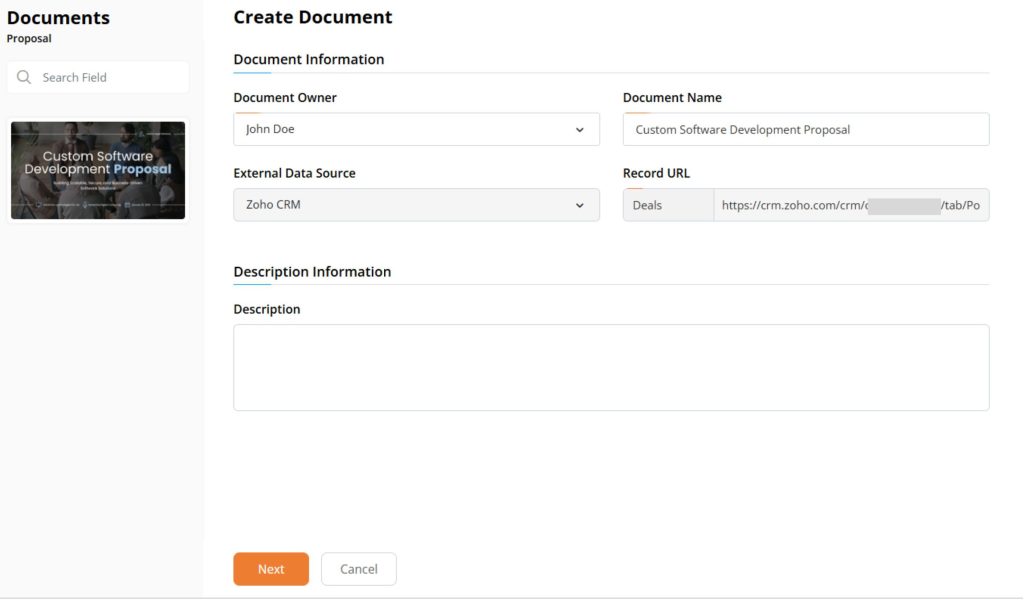
After selecting a template, the system automatically prepopulates key fields such as the external data source and record URL. This means the proposal is already linked to the selected deal. There is no need to copy or paste information manually. You can proceed directly to customization, with all relevant data available. This step plays a crucial role in ensuring accuracy while creating client-ready proposals with Zoho CRM.
Inside the editor, you can insert merge fields by typing the “#Account Name” symbol. This allows you to pull data directly from the crm deal, as well as from related account and contact records. You can insert details such as client name, company information, or deal value with ease. These fields update automatically based on CRM data, ensuring every proposal is personalized without additional effort. At the same time, this approach maintains consistency across all proposals.
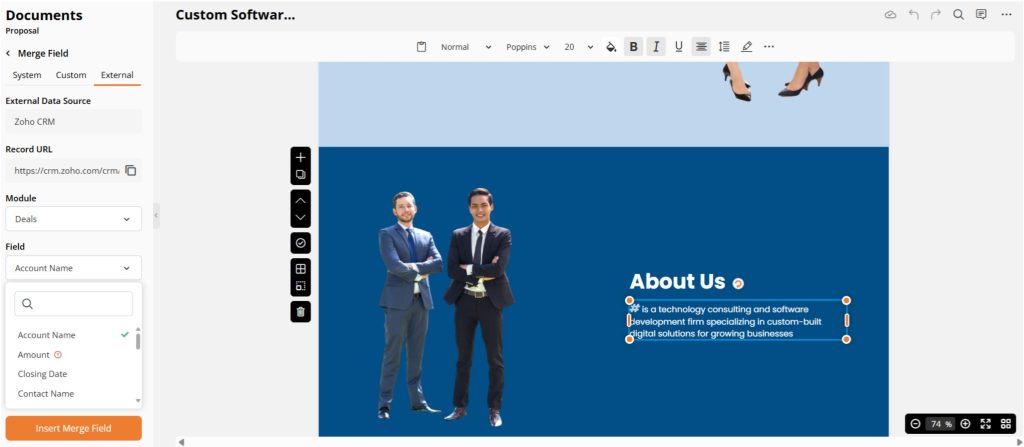
Once the merge fields are in place, review the proposal and make any necessary adjustments. You can modify scope of work, timeline, or pricing to better align with client requirements. Since branding, colour and structures are already standardized, you get an on-brand proposal every time. It allows you to focus on refining the content rather than building the document from scratch. After finalizing, you can publish the proposal for client sharing.
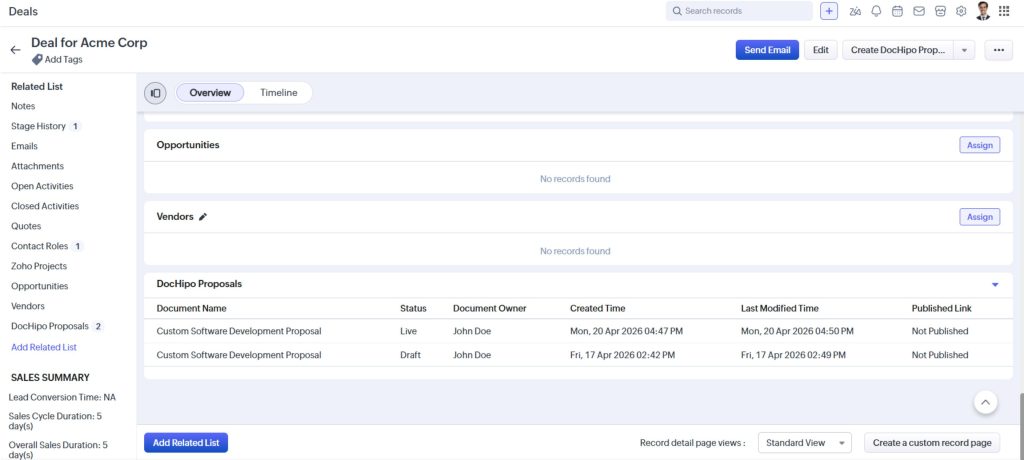
After publishing, the proposal is automatically linked to the deal record in Zoho CRM. It appears in the related list, where you can monitor its status at any time. The status may be Draft, Live, Accepted, or Declined, providing clear visibility into the progress of each deal. This eliminates the need for external tracking and keeps your entire team aligned. With everything managed in one place, this completes the lifecycle of client-ready proposals with Zoho CRM in a seamless and efficient manner.
Important Note:
The DocHipo extension for Zoho CRM is primarily designed for paid CRM editions that support marketplace integrations and direct data sync. However, users on the free plan are not restricted. While they may not be able to install or use the native integration, they can still manually create proposals by copying and pasting the Zoho CRM record URL (i.e. Deal URL) into the DocHipo interface, in the Record URL field.
Creating proposals directly within Zoho CRM transforms the way sales teams operate by bringing speed, accuracy, and consistency into one unified workflow. Instead of relying on multiple tools and manual processes, teams can generate proposals using real-time CRM data, which reduces errors and eliminates duplication.
This integrated approach not only saves time but also ensures that every proposal reflects the latest deal information. As a result, teams can focus more on strategy and client engagement rather than repetitive administrative tasks. Over time, this leads to improved productivity, better collaboration, and a more structured sales process that supports long-term growth.
With this approach, businesses benefit from:
Together, these advantages highlight the true value of creating client-ready proposals with Zoho CRM and DocHipo, where efficiency and consistency directly contribute to better sales outcomes.
To get the best results from your proposal workflow, it is important to follow a structured and thoughtful approach. While the integration with DocHipo simplifies the process, the quality of your proposals still depends on how well you design and manage data in your CRM. By focusing on clarity, consistency, and proper data usage, teams can significantly improve both efficiency and client experience. A well-optimized process ensures that every proposal not only looks professional but also communicates value effectively.
To enhance your proposal creation process, consider these best practices:
By following these practices, businesses can maximize the impact of client-ready proposals with Zoho CRM and create a more reliable, scalable, and professional proposal process.
Proposals play a critical role in shaping the final outcome of any deal. They are not just documents but a direct reflection of your business value, clarity, and professionalism. A well-structured proposal builds trust, strengthens client confidence, and increases the likelihood of conversion. However, achieving this consistently can be challenging when teams rely on manual processes and disconnected tools. This is where a streamlined approach becomes essential.
By integrating DocHipo with Zoho CRM, businesses can transform how proposals are created and managed. The entire process becomes faster, more accurate, and highly consistent, as data flows directly from the CRM into structured templates. This eliminates repetitive tasks, reduces errors, and allows teams to focus on delivering meaningful and personalized content. At the same time, it improves internal efficiency and ensures a seamless client experience.
For growing businesses and modern sales teams, this approach is no longer optional. It is a practical step toward improving productivity and closing deals more effectively. By adopting client-ready proposals with Zoho CRM, you create a workflow that supports both speed and quality, helping you turn every opportunity into a successful outcome. Here are our experts to help you know more.