
Modern businesses generate large volumes of customer and sales data every day. Business leaders often make decisions under tight deadlines. Waiting for weekly reports or manual updates can slow progress. CEOs need instant access to reliable information about sales, revenue, marketing, and customer relationships. Dashboards in Zoho CRM help CEOs convert that data into meaningful business insights. Instead of reviewing multiple reports, leaders can monitor important metrics from one centralized location. This approach saves time and supports faster decision-making. It also helps businesses identify opportunities before they become obvious. Whether you manage a growing startup or an established enterprise, having the right dashboards can improve visibility across every department.
Zoho CRM offers flexible dashboard customization for businesses of every size. You can build dashboards that match your industry, goals, and reporting needs. From tracking sales
In this article, we’ll explore seven essential dashboards in Zoho CRM every CEO should have. We’ll also discuss the key metrics each dashboard should include and explain how they contribute to better business decisions.
A successful business depends on timely and informed decisions. However, those decisions require accurate information. A Zoho CRM dashboard brings your most important business metrics together in one place. Instead of switching between reports, spreadsheets, and meetings, CEOs gain a complete overview within seconds.
Unlike traditional reports, dashboards update automatically as new data enters the CRM. This real-time visibility helps leaders respond quickly to changing market conditions. It also improves planning, forecasting, and overall business performance.
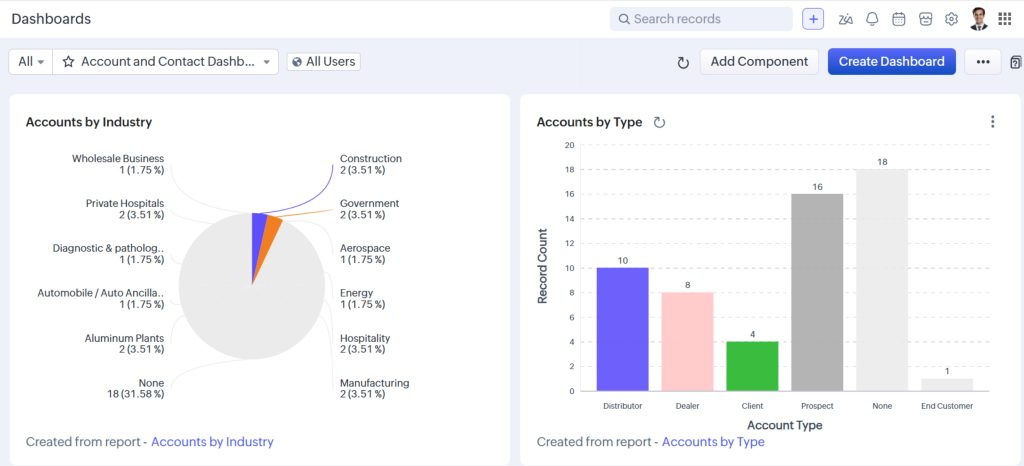
Raw business data rarely tells a complete story. Dashboards transform numbers into visual insights that are easy to understand.
A dashboard can display sales trends, revenue growth, lead sources, and customer activity using charts and graphs. These visuals make it easier to identify patterns and unusual changes. As a result, CEOs spend less time analyzing data and more time making strategic decisions.
Dashboards also encourage proactive management. Instead of reacting after problems arise, business leaders can identify risks early and take corrective action.
Now, let’s explore the seven dashboards every CEO should review regularly.
Sales remain one of the strongest indicators of business health. Every CEO should begin the day by reviewing an sales dashboard. This dashboard provides an instant snapshot of the company’s sales performance.
Rather than analyzing dozens of reports, CEOs can understand pipeline health, revenue progress, and sales trends within minutes.
An effective sales dashboard should include the following metrics:
These metrics provide a comprehensive overview of current sales performance.
Visual elements such as funnel charts, KPI widgets, and revenue trend graphs make the dashboard even more effective. They allow executives to identify changes quickly without reading detailed reports.
Daily sales visibility helps CEOs detect opportunities and challenges before they affect business performance.
For example, a sudden drop in qualified opportunities may indicate issues with lead generation. A growing number of stalled deals could highlight bottlenecks in the sales process. Similarly, declining win rates may signal increased competition or pricing concerns.
By identifying these trends early, leaders can take corrective action before revenue suffers.
This dashboard also supports better communication during leadership meetings. Instead of discussing assumptions, teams can review real-time data and align on priorities.
While current sales performance is important, future revenue deserves equal attention. That brings us to the next essential dashboard.
Looking at past performance alone is not enough. CEOs also need confidence about future revenue. A revenue forecast dashboard helps leaders estimate upcoming income based on active opportunities and sales trends.
Zoho CRM uses pipeline data to generate reliable forecasts. This information supports financial planning and long-term business decisions.
A revenue forecasting dashboard should include:
These metrics help leaders understand whether the business is on track to achieve its financial goals.
Charts comparing forecasted revenue against actual revenue also reveal forecasting accuracy over time. Better forecasting leads to stronger budgeting and resource planning.
Revenue forecasts influence many executive decisions.
Hiring plans often depend on projected business growth. Marketing budgets also rely on expected revenue. Business expansion, inventory planning, and technology investments become easier when executives understand future financial performance.
Forecast dashboards also help identify potential revenue gaps before they become serious problems. If projected revenue falls below targets, leadership teams can launch targeted sales campaigns or adjust business strategies early.
Regular forecasting creates greater confidence across the organization. Teams understand business expectations and work together toward measurable goals.
While forecasting predicts future growth, CEOs must also evaluate the people responsible for achieving those goals. The next dashboard focuses on measuring sales team performance.
A growing sales pipeline is valuable only when your team consistently converts opportunities into customers. A sales team performance dashboard helps CEOs evaluate productivity, identify top performers, and recognize coaching opportunities. It also ensures that every salesperson contributes toward the company’s revenue goals.
The effectiveness of a sales team depends on more than revenue alone. A balanced Zoho CRM dashboard should monitor several performance indicators.
A CEO should use this dashboard to improve the team’s overall effectiveness, not just measure results.
The dashboard helps leaders answer important questions, including:
Instead of making assumptions, CEOs can use real-time Zoho CRM reports to guide coaching sessions. This approach creates a stronger sales culture and improves long-term performance.
A productive sales team also depends on a steady flow of qualified leads. The next dashboard helps measure how effectively your business generates those opportunities.
Sales success begins with quality leads. Even the best sales team cannot perform without a consistent pipeline. A lead generation and conversion dashboard helps CEOs understand where leads come from, how they progress, and which marketing channels produce the highest returns.
This Zoho CRM dashboard also strengthens collaboration between marketing and sales teams.
Every business invests in multiple marketing channels. This dashboard helps determine which channels deserve additional investment.
Important metrics include:
Generating leads is only the first step. CEOs also need to understand which leads become paying customers.
A lead conversion dashboard should answer questions such as:
These insights help marketing teams allocate budgets more effectively. They also allow sales teams to prioritize high-quality opportunities.
As lead generation improves, businesses naturally acquire more customers. Retaining those customers becomes the next priority.
Acquiring new customers is important, but retaining existing customers often costs less and delivers higher profitability. A customer retention dashboard helps CEOs measure customer loyalty, identify growth opportunities, and reduce customer churn.
An effective dashboard in Zoho CRM focuses on long-term customer relationships instead of short-term sales.
Customer retention depends on several business indicators. Monitoring these metrics provides a complete view of customer health.
Include the following KPIs in your dashboard:
Customer relationships require continuous attention after the initial sale. This Zoho CRM dashboard helps CEOs ensure that customers remain engaged throughout their journey.
Review important relationship metrics, including:
These insights help teams resolve problems before they affect customer loyalty. They also create opportunities for stronger relationships and future business.
Customer retention is a shared responsibility across sales, support, and account management teams. A centralized dashboard keeps everyone aligned around customer success.
While customer relationships drive long-term growth, daily operational discipline keeps the business moving forward. The next dashboard focuses on measuring team productivity and business activities.
A successful business depends on consistent execution. Revenue grows when teams complete the right activities at the right time. An activity and productivity dashboard helps CEOs understand whether employees remain engaged and productive throughout the sales process.
This Zoho CRM dashboard also helps managers identify workload imbalances before they affect performance.
Daily activities directly influence sales outcomes. Tracking these metrics helps leaders ensure that important customer interactions never fall behind.
Include the following KPIs in your dashboard:
Monitoring activities is valuable only when the information drives meaningful improvements.
An activity dashboard helps answer several important questions:
These insights help managers balance workloads, improve accountability, and remove operational bottlenecks. As a result, teams remain productive while delivering a better customer experience.
While individual activities matter, CEOs also need a complete picture of business performance. That is where the final dashboard becomes essential.
A Business Health Dashboard combines the most important business metrics into one executive view. Instead of switching between multiple dashboards, CEOs can review overall business performance from a single screen.
Many business leaders begin their day by checking this executive dashboard in Zoho CRM. It provides a quick snapshot of company performance and highlights areas requiring immediate attention.
This dashboard should combine KPIs from sales, marketing, customer success, and operations.
Consider including these metrics:
Every executive has limited time each day. Consolidated business dashboards in zoho crm helps leaders prioritize their attention.
This dashboard enables CEOs to:
Instead of reacting to problems, CEOs can proactively guide the business toward growth.
Building a dashboard is only the first step. Its design determines how useful it becomes for decision-making. Following a few best practices will ensure your dashboards remain simple, relevant, and actionable.
Adding every available metric creates unnecessary complexity. A dashboard should answer the most important business questions quickly.
Keep these recommendations in mind:
A clean dashboard improves readability and speeds up decision-making.
Every department measures success differently. Creating role-specific dashboards improves focus across the organization.
For example:
Zoho CRM allows businesses to create customized dashboards for different user roles. This flexibility ensures that every stakeholder sees the information most relevant to their responsibilities.
Business priorities change over time. Your dashboards should evolve as your organization grows.
Schedule regular reviews to:
Regular improvements ensure that your Zoho CRM dashboards continue delivering meaningful business insights.
CEOs cannot afford to make decisions based on assumptions. They need reliable information that is available when they need it. A well-designed Zoho CRM dashboard transforms business data into meaningful insights that support faster and smarter decisions.
From monitoring sales performance to forecasting revenue and improving customer retention, each dashboard serves a unique purpose. Together, these dashboards provide a complete view of business performance. They also encourage collaboration between departments and improve strategic planning.
The best dashboards remain simple, relevant, and aligned with business goals. When designed correctly, they help CEOs identify opportunities, reduce risks, and respond quickly to changing market conditions.
If your business already uses Zoho CRM, now is the perfect time to review your reporting strategy. Get in touch with our experts today to discover how customized Zoho CRM dashboards can help your leadership team achieve better business outcomes.