
In any growing business, managing who can see what, who can do what, and how data flows across teams becomes critical. This is where Roles and Profiles in Zoho CRM play a decisive role in shaping both security and productivity. They are not just configuration elements tucked away in the setup panel; they are the backbone of how securely and efficiently your CRM operates.
As businesses scale, teams expand, responsibilities diversify, and data sensitivity increases. Without a structured system of access control, organizations risk data leaks, operational confusion, and reduced efficiency. Zoho CRM addresses this challenge through well-defined Roles and Profiles that help businesses align system access with real-world hierarchies and job responsibilities. In this blog, we’ll explore what Roles and Profiles are, how they differ, and most importantly, how they shape security and productivity with practical, business-driven examples.
Before diving into their impact, it’s essential to understand what Roles and Profiles actually mean in Zoho CRM and how they work together.
A Profile in Zoho CRM defines what a user can do within the system. It controls permissions at a functional level, such as:
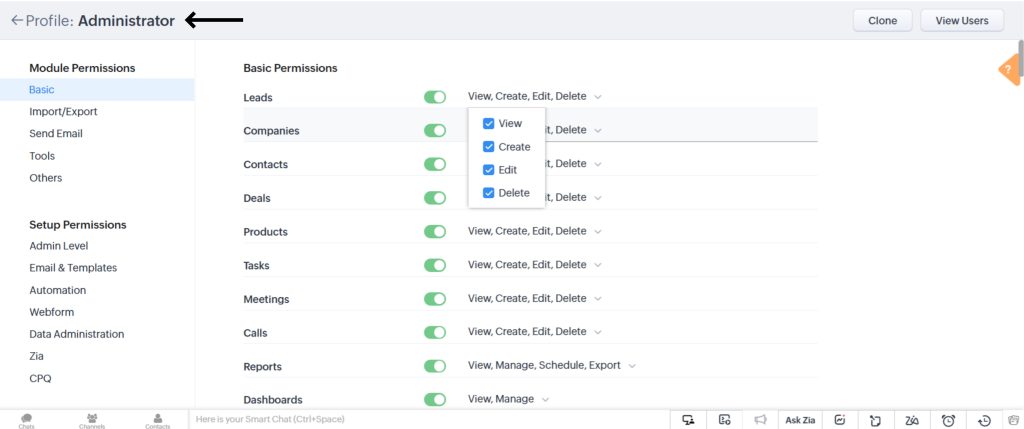
In simple terms, a profile answers the question: What actions is this user allowed to perform in the CRM? Profiles are ideal when multiple users share similar job responsibilities. For example, all sales executives may follow the same profile because they need similar access levels.
A well-defined profile ensures that users see only what they need to perform their job. Nothing more, nothing less. This reduces system clutter and minimizes the risk of unauthorized actions.
While profiles define what a user can do, roles define whose data a user can access. Roles are based on organizational hierarchy and reporting structures. Roles help:
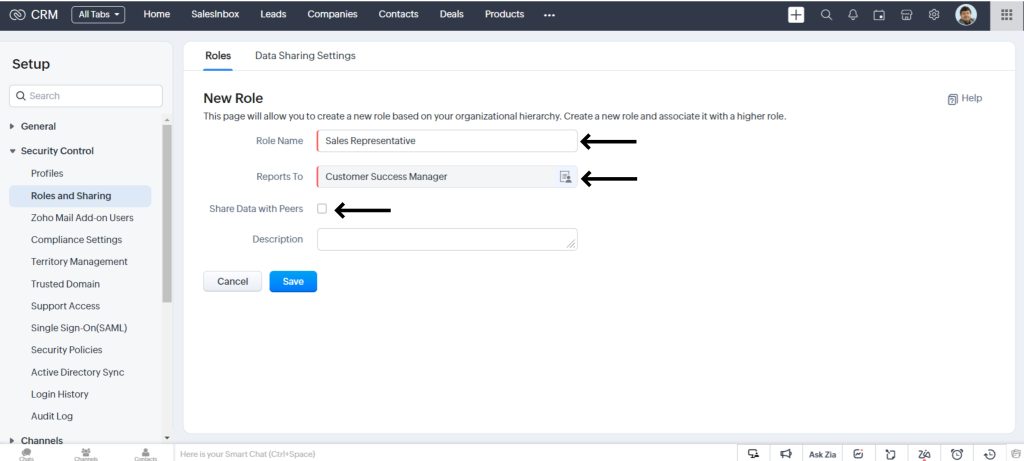
For example, a Sales Manager role may have visibility into all records owned by Sales Executives reporting to them, while a Sales Executive may only see their own records.
In essence, a role answers the question: Whose data can this user see in the CRM?
Roles and profiles in Zoho CRM are designed to function as a unified access-control framework rather than standalone configurations. When one is set up without the other, businesses often experience gaps in data visibility, security loopholes, or operational inefficiencies. To build a CRM environment that is both secure and productive, it is essential to understand how these two elements complement each other.
Profiles in Zoho CRM primarily manage functional permissions. They determine what a user is allowed to do within the system, such as which modules they can access, whether they can create, edit, delete, or export records, and their access to reports, workflows, and automation tools. In contrast, roles focus on hierarchical data visibility. They define which records a user can see, based on organizational structure and reporting relationships.
When Roles and Profiles in Zoho CRM are combined effectively, businesses achieve layered access control. Users gain the permissions required to perform their responsibilities while being restricted to viewing only the data relevant to their position. This balance ensures sensitive information remains protected without slowing down daily operations or decision-making.
For example, two users may share the same Sales Executive profile, allowing both to create and update deals, manage follow-ups, and track customer interactions. However, if one belongs to the Domestic Sales role and the other to the International Sales role, their data visibility remains distinct. Each executive can view only the deals and customer records aligned with their role hierarchy, while managers retain oversight across teams. This structured approach strengthens security, improves accountability, and enhances productivity across the organization.
Security is one of the most critical pillars of any CRM system, especially as businesses handle increasing volumes of sensitive customer and operational data. Roles and profiles in Zoho CRM play a vital role in safeguarding this information by introducing a structured, multi-layered access control mechanism that minimizes risk without disrupting daily workflows.
This results in:
Sales teams can focus on leads and deals, support teams on tickets and contacts, and finance teams on invoices and reports, without distractions.
In a real estate business, data sensitivity varies across roles. Agents, managers, and finance teams all interact with the CRM differently.
Profiles:
Sales Agent Profile: Access to Leads, Deals, Properties (limited), no delete or export rights
Sales Manager Profile: Full access to sales modules, reports, and dashboards
Finance Profile: Access to invoices, commissions, and payment details only
Roles:
Junior Agent → Senior Agent → Sales Manager → Director
Agents can only view and manage their own deals, while managers have visibility into team performance. Finance users cannot access lead conversations, ensuring confidentiality.
This structure improves security while enabling faster deal closures and accurate commission tracking.
Law firms deal with highly confidential client information, making access control critical.
Profiles:
Intake Executive: Create leads and contacts, no access to billing or documents
Associate Lawyer: Access assigned matters, limited edit rights
Partner Profile: Full visibility across matters, billing, and reports
Roles:
Intake Team → Associate → Senior Associate → Partner
Here, Roles and Profile in Zoho CRM ensure that sensitive case details are visible only to authorized legal professionals, while intake teams focus purely on client onboarding. Productivity improves as each team works within a clearly defined scope.
In a Professional Services company with multiple sales regions:
Profiles define actions like deal creation, quote generation, and discount approvals.
Roles define regional hierarchies, including North America Sales, EMEA Sales, and APAC Sales.
Sales reps see only their regional pipeline, while global sales heads view consolidated data. This structure prevents data overload and improves decision-making.
A well-structured setup of Roles and Profiles in Zoho CRM is essential for maintaining a secure, scalable, and user-friendly CRM environment. When access controls are thoughtfully planned, businesses can protect sensitive data, improve user adoption, and ensure smooth day-to-day operations. Instead of treating roles and profiles as one-time configurations, organizations should view them as strategic elements that evolve with business growth and process changes.
Step 1: Map your organizational hierarchy before creating roles
Clearly define reporting structures and team relationships to ensure data visibility flows logically from individual contributors to managers and leadership.
Step 2: Design profiles based on job functions, not individuals
Create profiles aligned with responsibilities such as sales, support, finance, or management to maintain consistency and simplify user onboarding.
Step 3: Follow the principle of least privilege
Grant users only the permissions they need to perform their tasks, reducing the risk of data misuse, accidental deletions, or system errors.
Step 4: Regularly audit and refine access settings
Periodic reviews help identify outdated permissions and ensure Roles and Profiles in Zoho CRM remain aligned with current team structures.
Step 5: Align roles and profiles with evolving business processes
As workflows change, update access controls to support efficiency without compromising security.
A thoughtful setup today helps prevent operational challenges tomorrow while enabling secure, productivity-driven CRM usage.
Roles and Profiles in Zoho CRM are far more than basic administrative configurations. They are strategic building blocks that directly influence how securely and efficiently your organisation operates. When implemented with intent, they create a structured CRM environment where data is protected, responsibilities are clearly defined, and teams can focus on what truly matters: driving results. By controlling what users can do and what data they can access, businesses reduce risks while enabling smoother, faster workflows across departments.
No matter the industry, whether real estate, legal services, Professional Services company, or any service-driven business, aligning CRM access with real-world roles and responsibilities is essential for long-term scalability. As teams grow and processes evolve, a well-designed role and profile structure ensures your CRM adapts without becoming complex or restrictive.
Investing time in setting up Roles and Profiles in Zoho CRM today helps you avoid operational bottlenecks tomorrow, while laying the foundation for secure, productivity-driven growth. If you’re planning to implement Zoho CRM or optimize an existing setup, partnering with experienced Zoho CRM consultants can make all the difference. Connect with our experts who understand both the platform and your business goals, and unlock the full potential of Zoho CRM with confidence.