
Businesses often rely on multiple software applications to manage their daily operations, yet standard solutions may not accommodate every process or requirement. As companies grow, they may need more flexible solutions that support their unique workflows. Building business applications with Zoho Catalyst offers a way to address these gaps by creating custom solutions tailored to specific business needs.
Instead of relying entirely on off-the-shelf software, businesses can develop applications that simplify internal operations, improve customer interactions, and support specialized workflows.
Zoho Catalyst provides a platform for developing custom applications with frontend interfaces, backend logic, data storage, and integrations. Businesses can use it to create solutions for internal teams or provide dedicated digital experiences for customers, dealers, vendors, and other external users.
There are two primary approaches to building these applications. Businesses can extend their existing Zoho applications with custom portals and interfaces, or develop standalone applications for processes that require an independent solution.
As businesses expand, their processes often become more complex. The software that worked initially may no longer support every operational requirement. Several challenges can create a need for custom applications.
Custom applications offer a way to address these gaps. The objective is not necessarily to replace existing software. It is to build the missing capabilities around the systems a business already uses.
Many businesses already use Zoho applications to manage customer relationships, financial transactions, inventory, or other internal operations. However, their customers and business partners may need a different way to interact with that information.
Zoho Catalyst can support custom application development around existing systems, creating a dedicated interface for external users while internal teams continue working with their established applications.
For example, a manufacturer might use Zoho CRM to manage dealer relationships and Zoho Books to handle financial records. Instead of giving every dealer access to these internal applications, the business could develop a dedicated dealer portal.
How This Approach Works
The architecture can be understood through a simple flow:
External user → Custom Catalyst portal → Integration layer → Existing Zoho applications
The exact integration design depends on the connected applications, data requirements, authentication model, and permissions.
Manufacturers often work with multiple dealers who need regular access to order information, product documents, and business updates. Managing these interactions through emails and phone calls can create unnecessary work for internal teams.
A custom dealer portal built with Catalyst could provide:
Business value: Dealers gain a convenient, centralized experience, while internal teams retain their existing systems for managing customer relationships and business operations.
Customers frequently contact businesses to request updates, retrieve documents, or check the progress of ongoing work. A self-service portal can help customers access this information without contacting an employee for every update.
Depending on the business process, the portal could include:
For example, a consulting firm could provide clients with a dedicated space to track project milestones and access approved deliverables.
Business value: Customers gain greater visibility into their interactions with the business. Employees can spend less time answering routine status enquiries.
Businesses that coordinate with multiple vendors or partners often manage requests, documents, approvals, and updates through scattered communication channels. A dedicated portal can bring these interactions into one structured environment.
Potential features include:
For instance, a company could allow vendors to submit quotations and check approval progress through a custom portal while its internal team continues managing purchasing activities through its existing systems.
Business value: A structured portal improves coordination, reduces fragmented communication, and gives external stakeholders a clearer view of their interactions with the business.
Not every business requirement depends on an existing Zoho application.
Sometimes, a business needs a dedicated solution for a specialized operation. Its workflows, data structures, and user roles may be different from those supported by its existing CRM or accounting software.
In these situations, Zoho Catalyst can serve as the foundation for a standalone application, with its own frontend, backend logic, and data management.
How This Approach Works
A standalone application can follow this general architecture:
Application users → Custom frontend → Catalyst backend → Data storage and business logic
The different components serve distinct purposes:
Catalyst provides services for developing these components. The specific architecture depends on the application’s functionality, data needs, security requirements, and expected usage.
Here are three examples of standalone business applications that could be developed using this approach.
A logistics company may need to coordinate shipments, drivers, dispatch teams, and customers through one system.
When these activities are managed using separate tools, tracking delivery progress and resolving exceptions can become difficult.
A custom logistics application could include:
The application could also provide different interfaces for drivers, dispatchers, administrators, and customers.
Business value: A purpose-built system can bring logistics activities into one operational workflow, helping teams coordinate deliveries and identify delays more efficiently.
Training providers, corporate learning teams, and educational organizations may need more than a basic course catalogue.
They may require a dedicated application to manage participants, trainers, schedules, learning materials, and course progress.
A standalone application could support:
For example, a corporate training provider could use the application to manage multiple training programs, assign trainers, track attendance, and monitor participant progress.
Business value: The organization gains a centralized platform designed around its training operations, reducing dependence on disconnected spreadsheets and manual follow-ups.
Businesses that manage products across warehouses, storage locations, or distribution centers need accurate inventory information to keep operations running smoothly.
A custom inventory management application can help teams track stock movement, monitor product availability, and coordinate replenishment through a centralized platform.
Key features could include:
For example, a distributor managing products across several warehouses could use a custom application to monitor stock levels at each location. When inventory falls below a defined threshold, the system could notify the purchasing team to initiate replenishment.
With Zoho Catalyst, businesses can develop an application tailored to their inventory processes, including custom interfaces, backend logic, and integrations with existing business systems. This helps organizations build workflows around their operational requirements rather than relying entirely on standard inventory software.
Both approaches can address business-specific requirements, but they serve different purposes. The right choice depends on your existing systems and the process you want to improve.
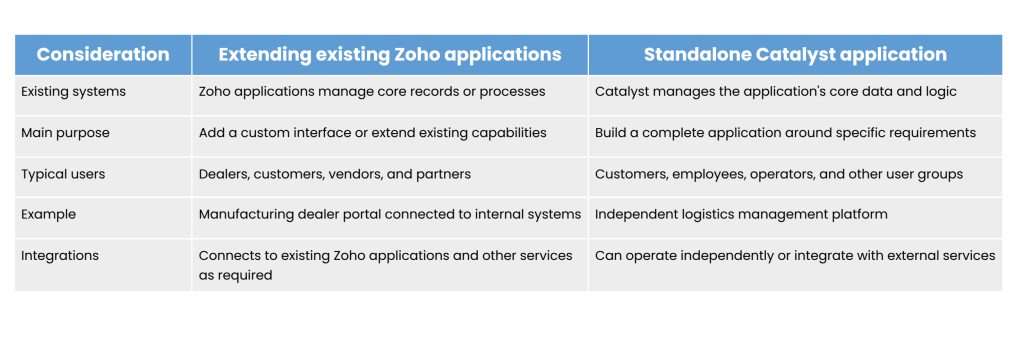
Consider this approach when your business already manages its core operations through Zoho applications but needs a better interface for external users. It can help you extend existing workflows without rebuilding the entire operational system.
Consider this approach when the required application has its own workflows, data structures, user experiences, and business rules. It is particularly useful when the solution does not naturally fit into your existing CRM or other business applications.
In some cases, a hybrid architecture may be appropriate. A standalone Catalyst application can still integrate with Zoho or other external systems where needed.
Beyond supporting different application architectures, Catalyst offers businesses an opportunity to design software around their operational requirements.
Here are some of the potential benefits.
The key is to plan for security, integration, performance, maintenance, and future requirements from the beginning.
Zoho Catalyst offers businesses a way to develop applications that address requirements standard software may not fully support. Organizations can extend their existing Zoho applications with dedicated portals or build standalone solutions for specialized operational processes.
The right approach depends on the business problem, existing systems, user requirements, and long-term goals. A dealer portal, for example, may benefit from an architecture connected to existing CRM records. A logistics management platform may require its own application workflows and data structures.
Building a custom application starts with understanding your business challenges, identifying gaps in existing systems, and defining the right solution for your needs.
At GoldenLion Consulting, our Zoho experts can help you explore how Zoho Catalyst can support your business goals through tailored applications and seamless integrations. Connect with our team to discuss your requirements and discover the right approach to building a solution that works for your business.