
Sales teams receive enquiries from websites, campaigns, referrals, and other channels. Responding quickly is important, but a meaningful response requires more than acknowledging a new lead. Businesses need to understand what the prospect wants, identify their requirements, and guide them toward the next step. A Zia Agent in Zoho CRM can make this process more intelligent by understanding customer context, personalizing follow-ups, and taking relevant actions based on predefined business instructions. With Zia’s AI capabilities and Zia Agents, businesses can move beyond basic automation and introduce agents that understand context, follow instructions, and perform defined tasks.
Imagine a prospective customer requesting a product demonstration. They mention their business challenges, preferred timeline, and a few questions. Instead of relying on a generic acknowledgement and a fixed email sequence, an AI agent can use this information to personalize the conversation, identify missing details, and coordinate the next action.
This is where Zia Agents introduce a different approach to CRM automation. They can work toward a defined objective, use business context, and initiate actions within configured boundaries. The adoption of AI across businesses continues to expand. According to OECD data, 20.2% of firms reported using AI in 2025, compared with 14.2% in 2024. As businesses explore practical applications, AI agents offer opportunities to bring intelligent capabilities into everyday processes, including customer communication and sales follow-ups.
Let’s explore how a follow-up agent could help a business manage new demo enquiries more effectively.
Zia Agents are AI-powered digital employees designed to perform specific business tasks.
Businesses can use pre-built agents available within Agent Studio or create custom agents as per their requirements.
An agent can be configured with:
For example, an SDR Agent can support early-stage sales activities such as researching prospects, answering queries, qualifying leads, and engaging potential customers. Similarly, a business could design a Follow-Up Agent around its own sales process. The agent can be deployed into Zoho CRM, where its activation conditions and permitted actions can be configured.
This means a Zoho CRM AI agent is not simply an email generator. It can become part of a connected business process, provided the required tools, access, and configuration are in place.
Traditional CRM automation is useful for managing repetitive sales activities.
A business can configure workflows to send an acknowledgement when a lead is created, assign an owner based on territory, or trigger reminders when a prospect does not respond. These workflows follow predefined conditions. They work well when the next action is predictable.
However, not every enquiry is the same.
Consider three prospects requesting a product demonstration:
A standard email workflow may send the same acknowledgement to all three. On the other hand a Zia agent can approach these enquiries differently by considering the information available in each record and preparing a response relevant to the prospect’s situation.
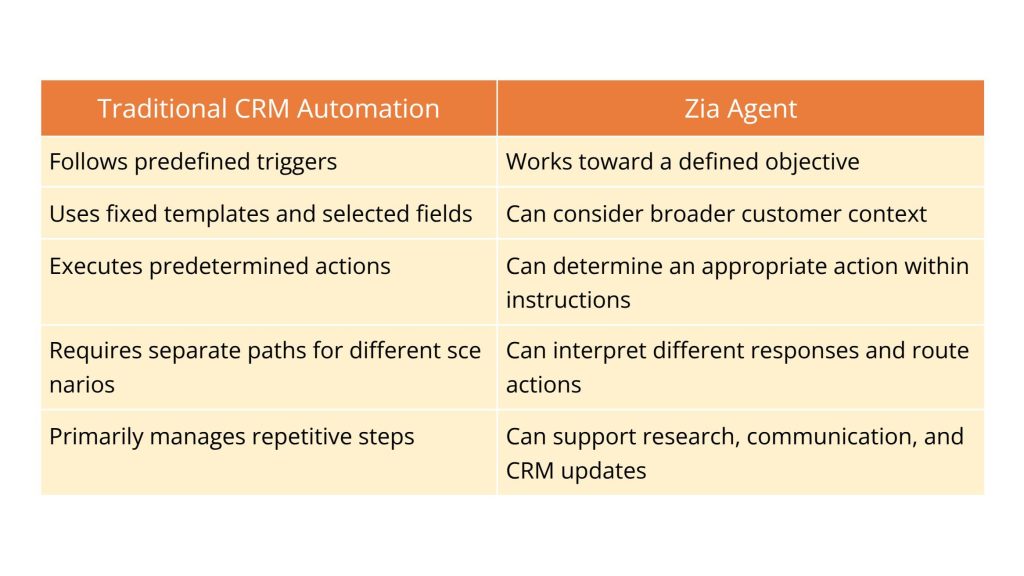
Traditional automation remains valuable. Zia Agents extend these capabilities to tasks that require contextual understanding and decision-making.
Imagine a company offering business software through a sales team. Its website receives demo requests every day. Each enquiry contains different requirements, questions, and expectations.
The sales team must review the information, respond, qualify the prospect, coordinate a meeting, and maintain accurate CRM records.
A custom Follow-Up Agent built using Zia Agents could support this process through a structured sequence.
The agent searches Zoho CRM for leads matching the business’s defined criteria.
For example:
Record is eligible for automated communication
These conditions help the agent identify which enquiries it can process.
Before drafting a response, the agent reviews the information available in the CRM. This may include lead details, company information, industry, product interest, requirements, expected implementation timeline, previous emails, calls, notes, and meetings. The agent builds a prospect context before writing anything.
For example, it may identify that a prospect from a growing manufacturing company wants to automate sales order tracking and connect CRM with an existing business system.
This context can help the agent prepare a response that acknowledges the actual requirement instead of sending a generic demo confirmation.
After reviewing the enquiry, the agent identifies the next step according to business instructions. Possible actions include acknowledging the demo request, asking for missing information, routing a specialized enquiry to a consultant, or prioritizing a time-sensitive lead.
The next action depends on the actual enquiry rather than a single predefined email sequence.
The agent uses approved business instructions to prepare the email. These may include brand tone, email structure, approved product information, claims it can and cannot make, CTA guidelines, meeting links, and signature.
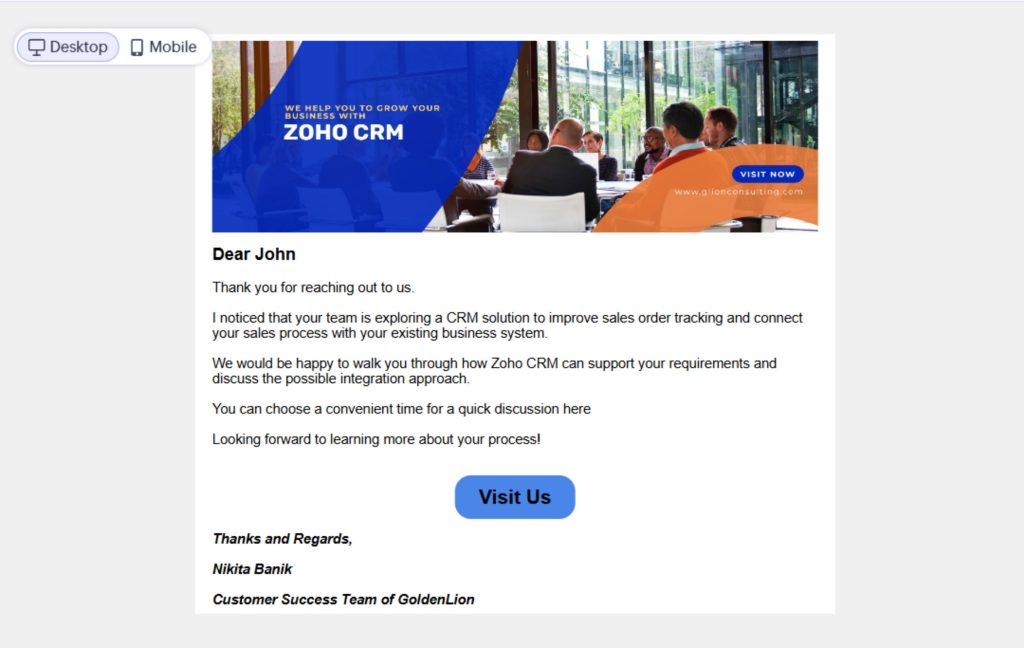
Depending on the organization’s approval policy, the agent can either prepare the email for review or send it automatically within defined boundaries.
The follow-up process continues after the first email. A prospect may confirm a meeting, ask for pricing, request more information, or postpone the discussion.
A well-configured agent can interpret these responses and initiate suitable CRM actions.
Prospect replies: “Thursday at 11 AM works for us.”
Agent Action:
Prospect replies: “Can you share the pricing before we schedule a demo?”
Agent Action:
Important Note: Always use approved pricing and commercial terms. Never let the agent offer unapproved discounts or make pricing commitments on behalf of the business.
Prospect replies: “Can Zoho CRM integrate with our existing ERP?”
Agent Action:
Prospect replies: “We are planning to evaluate CRM next quarter. Please contact us then.”
Agent Action:
The value of a Zia agent extends beyond writing personalized emails. It can coordinate multiple activities around a defined sales objective.
Identify → Understand → Personalize → Communicate → Interpret → Act → Record
This connected approach can help businesses improve response relevance, reduce repetitive administration, maintain consistent CRM records, and ensure that complex questions reach the right people.
The Agent Studio offers a range of ready-to-use AI agents designed for specific business needs, including SDR Agents, Quote Creation Agents, and Account Manager Agents. Businesses can use these pre-built agents or create custom agents tailored to their unique workflows and requirements.
An AI agent is only as useful as the process and information supporting it.
Businesses should consider structured CRM data, relevant customer context, clear business instructions, defined actions, escalation rules, and testing before deployment. Zia Agents can be configured with instructions, knowledge sources, tools, and connections. These determine what an agent understands, which systems it can access, and what actions it can perform.
For a follow-up process, this could mean defining which leads the agent can contact, which email messages it can send, when it should create a task, and when a salesperson must take over. A staged rollout with salesperson review can help validate the agent’s behavior before enabling more autonomous actions.
AI adoption also varies by business size. Eurostat reports that 55% of large EU enterprises used AI in 2025, compared with 19% of SMEs. This highlights the difference in adoption across organizations and reinforces the importance of practical, scalable AI implementation. For smaller businesses, a focused use case such as intelligent lead follow-ups can provide a structured starting point.
A new enquiry is more than a name and email address in a CRM. It represents a business requirement, a potential opportunity, and the beginning of a customer relationship.
Introducing an AI agent requires more than configuring a prompt. With Zia Agents businesses can move beyond generic follow-up sequences. They can use customer context to prepare relevant communication, coordinate next steps, and maintain better CRM records.
The goal is not to remove salespeople from the process. It is to reduce repetitive work and help them spend more time on meaningful customer conversations.
Thinking about making your Zoho CRM smarter with Zia AI agents? GoldenLion can help you identify practical opportunities, design the right workflow, and implement AI capabilities around your business needs.